BTCUSDT · 1sa · Canlı
Volatility BandGrafikte aç
Kodu görüntüle
Volatility Band
// © Markuda
// Draws a band around price that widens and narrows with volatility.

// ═══════════════════════════════════════════════════════════════════════════════
// Markuda — VOLATILITY BAND
//
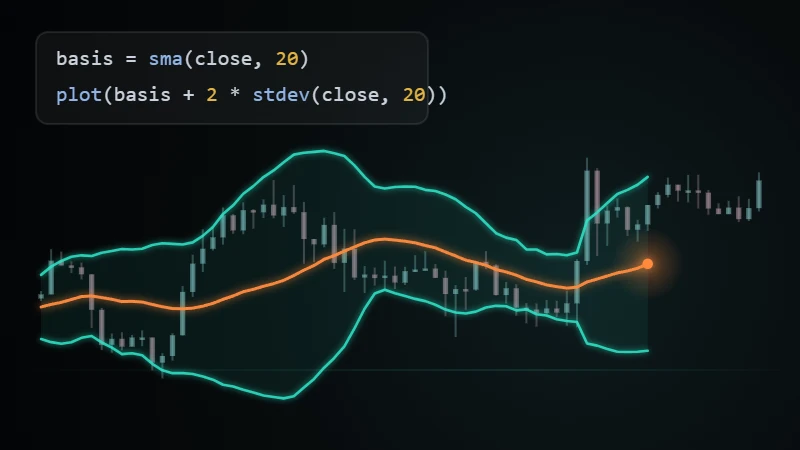
// Draws a band around price that widens and narrows with volatility. In a quiet
// market the band contracts; when movement starts it opens up. When price breaks
// out of the band, the background is tinted and the bar where it broke is marked.
//
// Inside the band is ordinary drift. Above it buyers dominate, below it sellers
// do. A band that has been narrow for a long time often precedes a move.
//
// This is an indicator: it computes past price and does not know the future.
// Nothing it draws is a forecast or investment advice; it does not trade and
// places no orders. It comes with the product as an example; you can read its
// code and change it to suit yourself.
// ═══════════════════════════════════════════════════════════════════════════════

// ── Texts ────────────────────────────────────────────────────────────────────
// All text on the chart is in English. Numbers follow the terminal's number style
// (thousands and decimal separators); that is formatting, not language.

nameRange   = "Window"
tipRange    = "How many bars the band's middle and width are computed from."
nameWidth   = "Band width"
tipWidth    = "How far each band sits from the middle, in average bar ranges. A larger value means a wider band."

nameMiddle  = "Middle"
nameUpper   = "Upper band"
nameLower   = "Lower band"
nameBrokeUp = "Broke above"
nameBrokeDn = "Broke below"

namePrice   = "Price"
stateAbove  = "Above"
stateBelow  = "Below"
stateInside = "Inside"

length = input(20, 10, 100, 5, nameRange, tooltip=tipRange)
mult   = input(2.0, 0.5, 5.0, 0.5, nameWidth, tooltip=tipWidth)

BLUE  = "#2962ff"
GREEN = "#089981"
RED   = "#f23645"
GREY  = "#787b86"

// ── Band ─────────────────────────────────────────────────────────────────────
middle = sma(close, length)
width  = atr(length) * mult
upper  = middle + width
lower  = middle - width

plot(middle, nameMiddle, GREY, 0, "line", 1, "dashed")
upperLine = plot(upper, nameUpper, BLUE, 0, "line", 2)
lowerLine = plot(lower, nameLower, BLUE, 0, "line", 2)
fill(upperLine, lowerLine, colorNew(BLUE, 92))

// ── Outside the band ─────────────────────────────────────────────────────────
above = close > upper
below = close < lower

bgcolor(above ? colorNew(GREEN, 90) : below ? colorNew(RED, 90) : na)
barcolor(above ? GREEN : below ? RED : na)

plotshape(crossover(close, upper), nameBrokeUp, shape.triangleup,
          location.belowbar, GREEN)
plotshape(crossunder(close, lower), nameBrokeDn, shape.triangledown,
          location.abovebar, RED)

// ── Panel ────────────────────────────────────────────────────────────────────
// Numbers follow the terminal's regional format: a dot for thousands and a comma for
// decimals in Turkish, the other way round in English. The number formatting used
// below handles this by itself.
if barstate.islast {
  state      = above ? stateAbove : below ? stateBelow : stateInside
  stateColor = above ? GREEN : below ? RED : GREY

  t = tableNew("top_right", 2, 4)
  tableSetBg(t, colorNew("#131722", 15))
  tableSetFrameColor(t, colorNew(GREY, 60))
  tableSetFrameWidth(t, 1)
  tableSetBorderColor(t, colorNew(GREY, 80))
  tableSetBorderWidth(t, 1)

  tableCell(t, 0, 0, namePrice)
  tableCell(t, 1, 0, state)
  tableCellSetTextColor(t, 1, 0, stateColor)

  tableCell(t, 0, 1, nameWidth)
  tableCell(t, 1, 1, "%" + formatNumber(width / middle * 100, 2))

  tableCell(t, 0, 2, nameUpper)
  tableCell(t, 1, 2, formatNumber(upper, 2))

  tableCell(t, 0, 3, nameLower)
  tableCell(t, 1, 3, formatNumber(lower, 2))

  // Labels sit on the left in a muted color; values are aligned right so the digits line up.
  i = 0
  while i < 4 {
    tableCellSetTextColor(t, 0, i, GREY)
    tableCellSetTextHalign(t, 0, i, "left")
    tableCellSetTextHalign(t, 1, i, "right")
    i := i + 1
  }
}